Account & Billing
What You Can Do Without an Account
Quite a lot, actually. The six example households open the entire app - plan, transactions, reports, net worth, lifetime projections, debt payoff - running on a fictional family’s numbers. No sign-up, no email, no card.
Those examples aren’t a screenshot tour or a limited demo. Every page works, and you can edit anything: change the Martinez family’s rent, re-categorize a transaction, redraw the allocation targets, watch the pyramid and the forecasts react. It’s the real app with someone else’s data in it.
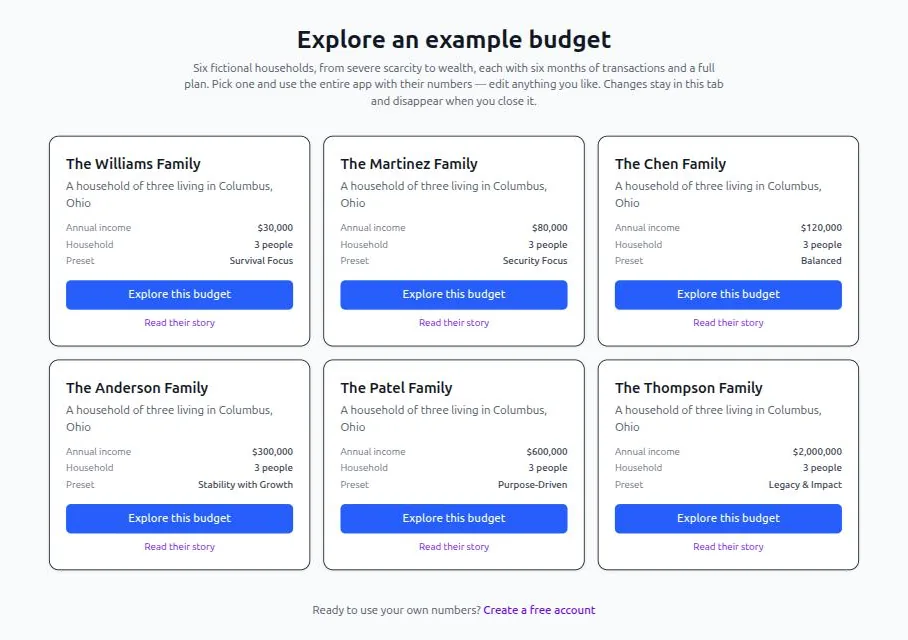
The catch is the one thing it can’t do: keep anything. An example runs entirely inside your browser tab and never reaches our servers. Your edits are gone when the tab closes, and there’s no way to carry them over into a budget of your own - the numbers belong to a household that doesn’t exist.
So examples are the right way to answer “do I like how this works?” They’re the wrong way to start budgeting.
Why Your Own Budget Needs an Account
An earlier version of Hierarchy Budget let you build a real budget with no account, stored in your browser. It’s gone, and deliberately.
Browser storage looks private and free until you meet its edges. It lives in one browser on one device, so the budget you built on the laptop isn’t on your phone. Clearing site data deletes it with no warning and no recovery. And the features people actually wanted next - bank feeds arriving on their own, receipts forwarded by email, a partner seeing the same numbers - all need a server by definition. Keeping both worlds working meant every screen had to handle two different sources of truth, and the seams showed.
So the app now has one place data lives: your account. It’s a simpler product to use and a much simpler one to trust, because there’s exactly one answer to “where is my budget?”
Creating an Account
Sign up at app.hierarchybudget.com with an email and password, or with Google.
That starts a 7-day trial. No card is required - you only reach Stripe if you decide to subscribe. The trial begins when you create the account, not when you first use a paid feature, so it’s worth signing up when you have an evening to actually set things up.
Coming from the old browser-based version? If you built a budget in that version in this same browser, sign in and the app will notice it and offer to import your income, expenses and periodic items in one click. Use the same browser you used before, or that data won’t be found. The original is kept as a backup either way.
What the Subscription Covers
$120 per year, annual only. Current details are on the pricing page.
| Every device | Accounts, transactions and plans reachable from any browser you sign in from |
| Bank feeds | Connect banks and cards through SimpleFIN; new transactions arrive on their own into a review queue |
| Statement import, including PDFs | CSV and OFX are straightforward; PDF statements get read for you |
| Categories that learn | Correct a payee once and the rule sticks, scoped to that account and direction |
| Receipts by email | Forward a receipt to your personal inbox address; it’s parsed and matched to its transaction |
| A second person | Share the household with a partner who signs in as themselves - not billed twice |
What Happens When the Trial Ends
Nothing is deleted and nothing is charged. Syncing and the assisted features stop. Your data stays exactly where it is, and you can export all of it - CSV, Excel and PDF - at any time, subscription or not.
That’s deliberate: leaving should never be the hard part. See Sharing & Your Data for what the exports contain.
Cancelling
Any time, from Settings, through the Stripe portal. You keep access through the end of the period you’ve already paid for. There’s no monthly plan.
Related Pages
- Pricing - Current price and what’s included
- Example Budgets - Use the whole app with no account
- Getting Started - Setting up your own budget
- Sharing & Your Data - Exports, a second person, starting over
- Privacy Policy - What’s stored and who else touches it