Getting Started with Hierarchy Budget
Before You Start
Two ways in, and they’re for different things:
- Just looking? Open an example household - no account, no email. You get the whole app running on a fictional family’s numbers and can change anything in it. Nothing is saved: the example lives in that browser tab and disappears when you close it.
- Ready for your own numbers? Create an account with an email or with Google. That starts a 7-day trial and needs no card. Your budget lives in your account, which is what lets it open on your phone and your laptop, take bank feeds, and be shared with a partner.
There’s no path from an example into a real budget - the numbers in there belong to a household that doesn’t exist. Explore first if you like, then start fresh below. See Account & Billing for the details.
The Basic Process
Hierarchy Budget helps you see what your spending actually serves. Not accounting categories. Human needs.
1. Set Up Your Categories
Before you can start budgeting, set up your expense and income categories at Settings > Categories.
For each expense category:
- Give it a name (e.g., “Groceries”, “Rent”, “Gym Membership”)
- Assign it a Maslow level - the human need this expense primarily serves
For income categories:
- Create categories like “Salary”, “Freelance”, “Dividends”
- Income categories don’t need a Maslow level
The level lives on the category, and everything else follows from it. When a transaction gets a category, it inherits that category’s level automatically - you never pick a level transaction by transaction. Categories missing a level are called out at the top of the page, because spending in them can’t be placed on the hierarchy.
Tips:
- Start simple - you can always add more later
- Think about what each expense is actually for, not just what it’s called
- Categories are reusable across months; renaming or re-levelling one keeps its history
2. Set Your Allocation Targets
Go to Settings > Allocation.
This is where you say what share of your income each level should get. Six presets are offered - Survival Focus, Security Focus, Balanced, Stability with Growth, Purpose-Driven, Legacy & Impact - or set your own percentages. They need to add to 100%.
Don’t worry about “correct” percentages. This is about seeing reality, not conforming to an ideal.
3. Build the Plan
Go to Plan > Monthly and enter what recurs every month:
- Your income - what actually lands, after tax
- Your expenses - one line per thing, each with a category and an amount
Items can be monthly, weekly, quarterly or annual; the app converts them to a monthly equivalent where it needs one.
Then go to Plan > Periodic for everything that doesn’t recur monthly - insurance premiums, vacations, holiday gifts, a bonus - and say which month each lands in.
Already have transaction history in the app? Plan > Calibrate reads your real spending and suggests the plan items you’re missing, which beats guessing.
3. Understand the Five Levels
As you build your budget, assign expenses based on what need they actually serve.
Key insight: Many expenses serve multiple needs. Split them honestly.
Physiological (Basic Survival)
Food, water, shelter, sleep, health. The body’s non-negotiables.
Examples: Groceries, rent/mortgage, utilities, basic internet, prescriptions
Safety (Security & Stability)
Protection from danger. The desire for a predictable, orderly world.
Examples: Insurance, emergency fund, debt payments, retirement savings, car maintenance
Split example: Basic car insurance -> safety. Premium coverage beyond legal requirements -> safety. Choosing a safer neighborhood -> safety.
Love & Belonging (Connection)
Social bonds, relationships, community. Feeling part of something larger.
Examples: Phone plan, social outings, gifts, family activities, pets, community groups
Split example: Premium groceries might be part health (physiological), part image and values signaling (love/belonging).
Esteem (Respect & Achievement)
Confidence, self-respect, achievement, recognition from others.
Examples: Professional clothes, gym, hobbies, courses, personal care, quality items that reflect identity
Split example: $600/month car payment - maybe $250 is reliable transportation (physiological/safety), $200 is professional image needed for work (esteem), $150 is about how it makes you feel (esteem). Split according to what you actually believe is necessary.
Self-Actualization (Becoming Your Full Potential)
Growth, creativity, expressing your unique capabilities.
Examples: Creative pursuits, meaningful travel, advanced education, mentorship, charitable giving, legacy projects
4. What the Percentages Mean
The targets you set in Settings > Allocation are what the hierarchy on your Dashboard measures against.
There are no “correct” percentages. Your allocation should reflect:
- Your actual income and circumstances
- What needs are genuinely calling for resources right now
- The gap between what you think you value and what your spending reveals
You’re Not at One Level - You’re Across All Five
This is critical: you’re never “at” the physiological level or “at” the esteem level. You’re always operating across all five simultaneously.
Maslow provided these rough estimates for an average person:
- 85% satisfied in physiological needs
- 70% satisfied in safety needs
- 50% satisfied in love needs
- 40% satisfied in self-esteem needs
- 10% satisfied in self-actualization needs
The hierarchy doesn’t show where you “are” - it shows how your resources are distributed across these simultaneously active needs.
5. Bring In What Actually Happened
You don’t type your actual spending in. It arrives as transactions, and there are four ways to get them:
- Bank Sync - connect your bank once and pull new transactions whenever you like
- Import - load an .ofx/.qfx statement file, which is how you backfill history
- Receipts - photograph one, or forward the email
- By hand - the + Add transaction button on the register
However they arrive, they land uncategorized in the Inbox. Approving each one teaches a rule, so next month there’s less to do. See Reviewing Transactions.
Once categorized, the hierarchy reveals:
- How much of each level’s budget you’re actually using
- Which needs are calling louder than your intentions
- The gap between plan and reality
This gap is information. Not failure. A window into what’s really motivating you.
For the detailed comparison, see Forecast vs Actual.
6. Observe
At month’s end, look at what the numbers show:
- Where did my resources actually go?
- Which needs got more attention than expected?
- Which needs did I neglect, even though I said they mattered?
- What does this reveal about what’s actually driving my behavior?
Don’t judge. Just observe.
Understanding the Hierarchy Visualization
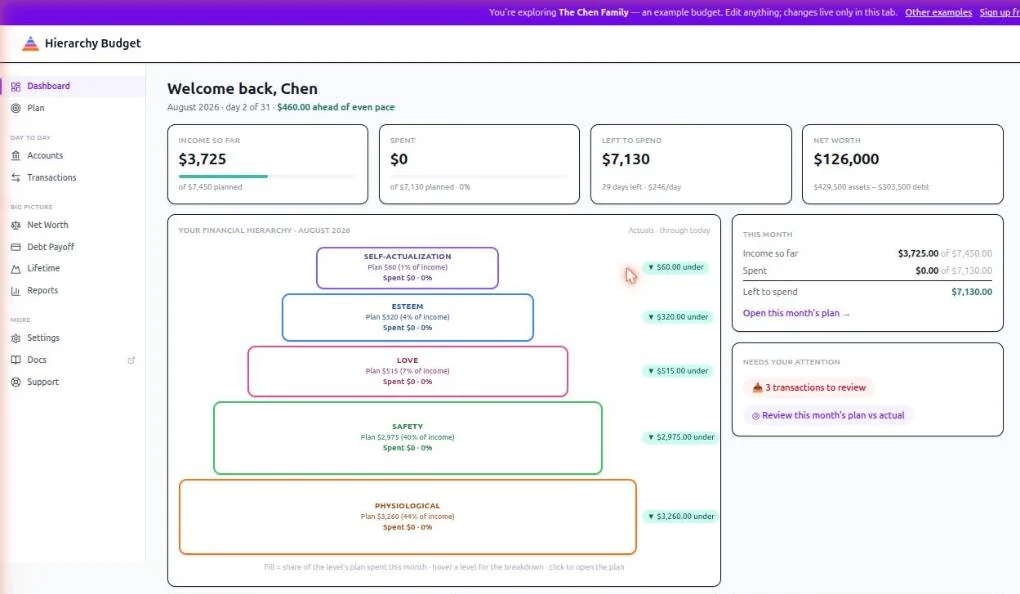
The hierarchy shows fill percentage for each level - how much of that level’s target budget you’ve actually allocated.
What the Fill Means
- Empty/Low Fill: You set a target percentage for this need, but didn’t allocate resources toward it.
- Partial Fill: You’re meeting this need partially. The percentage shows how much.
- Full/Overflow: You’re meeting or exceeding your target for this level.
Reading Your Hierarchy
Bottom-heavy: Most resources going to physiological and safety needs.
- Your income situation may genuinely call for this
- You may be recovering from instability
- Or: anxiety about safety is consuming resources
Top-heavy: Significant allocation to esteem and self-actualization while lower needs are underfunded.
- Basics may truly be met
- Or: avoiding dealing with foundational instability
Balanced: Resources distributed across levels.
- May indicate genuine stability
- Or: spreading too thin, nothing getting full attention
The question isn’t whether any pattern is “good.” The question is: what does this reveal about what needs are calling for resources?
The Plan Workspace
Everything about planning lives under Plan, and every tab shares one month selector in the top right - change the month once and it follows you across the tabs.
| Tab | What it’s for |
|---|---|
| Budget | This month: plan against actual, level by level |
| Monthly | The recurring template - income and expenses that repeat |
| Periodic | Everything that doesn’t recur monthly: premiums, vacations, bonuses, gifts |
| Annual | All 12 months at once, forecast with actuals overlaid |
| Calibrate | Suggestions drawn from your real spending history |
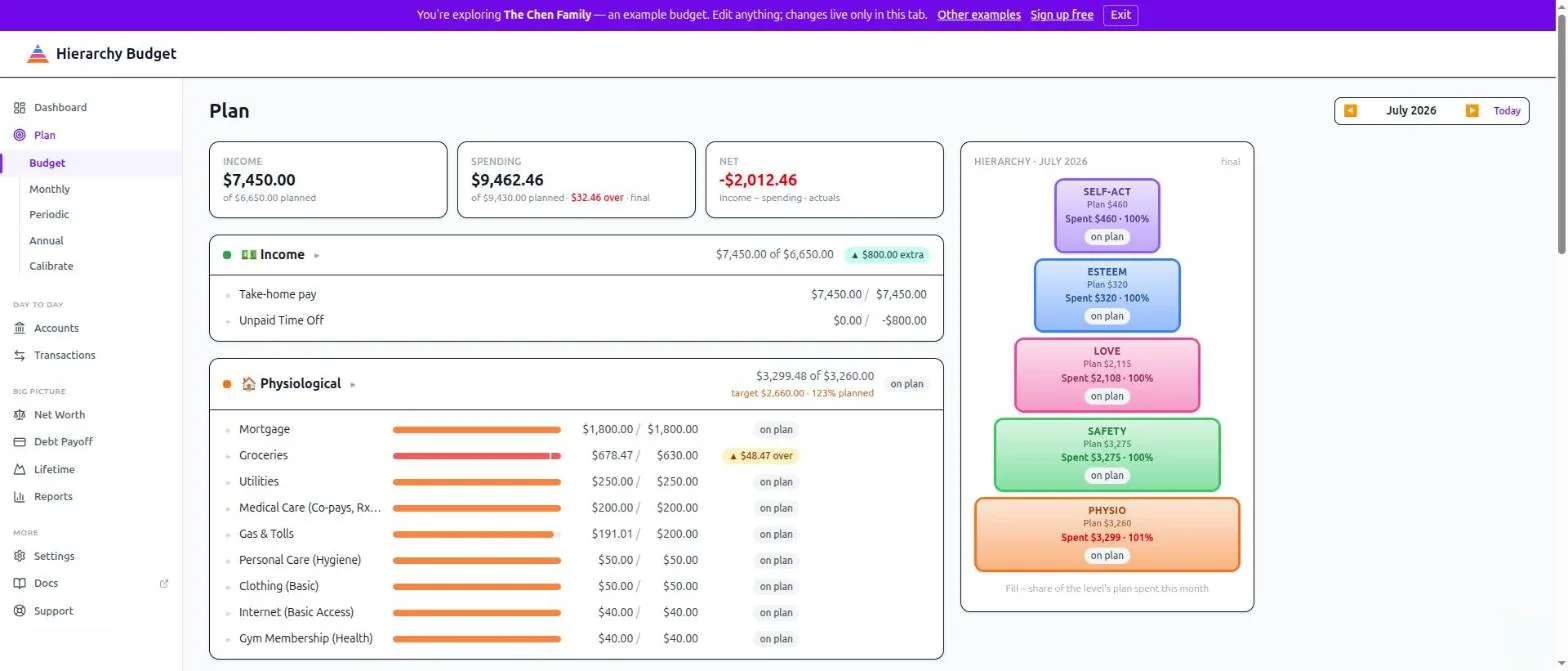
For the detail on Budget and Annual, see Forecast vs Actual.
Tips for Clarity
Be Honest
Enter what you’re actually spending, not what you wish you were spending. This is about seeing clearly.
Split Expenses That Serve Multiple Needs
“Coffee” could be physiological (caffeine), love (connecting with friends), or esteem (the cafe signals something about you). Where does it belong? Wherever it actually serves a need.
Your Hierarchy Will Shift
The needs calling for your resources now might be completely different next year. That’s not inconsistency. That’s life.
This Is a Mirror
This tool doesn’t tell you what you “should” spend. It shows you what you’re actually spending and reveals what needs are calling for those resources.
Common Questions
Q: What if an expense fits multiple categories?
A: Split it. That’s the power of this framework. A $600/month car payment isn’t just transportation - split it: $200 for reliable transportation (physiological/safety), $400 for status and image (esteem).
Q: I can’t save anything. Is this tool for me?
A: Yes. This tool can reveal what needs are consuming all your resources right now. That understanding might be more valuable than a savings rate.
Q: Should my hierarchy match some ideal percentages?
A: No ideal exists. Your allocation should match your actual situation, actual income, and actual needs calling for resources.
Q: How do I know what’s a “need” and what’s a “want”?
A: Maslow provides the framework. Physiological needs are non-negotiable. Safety needs keep you from chronic anxiety. Love needs are about real connection. Esteem needs are about genuine confidence. Self-actualization is about growth and becoming what you’re capable of.
Related Pages
- Plan > Monthly - Your recurring income and expenses
- Plan > Periodic - Annual and periodic items
- Plan > Annual - The full year
- Forecast vs Actual - How spending meets the plan
- Reviewing Transactions - Keeping actuals accurate
- Settings > Categories - Categories and their levels
- Settings > Allocation - Allocation targets